

How to create an offering with Cash Flow Portal
Introduction
An offering refers to when a company issues or sells a security. In multifamily syndications, potential investors must receive a professional offering package. It contains documents prepared by an SEC attorney that investors must read and sign in order to invest. Therefore, in simple terms, an offering is a security.
Now, let’s look at the initial steps for syndicators to create an offering using Cash Flow Portal.
1. Offering type

- Offering type – equity. In this type of syndication, investors have part equity ownership, are exposed to more risk and may benefit from the upside of the deal’s performance. There is no cap on investor returns, and they benefit from forced depreciation, cost segregation, and receive other tax advantages. The holding periods in equity deals are usually 5-7 years.
- Offering type – debt. In such a syndication, each investor becomes a private lender on the deal. A syndicator is a borrower that uses those funds to complete a property transaction. Such syndications are often development projects—the earnings of lenders are predetermined and consistent. Debt deals usually have a shorter hold time (between 6-24 months), and investors do not have any ownership stake in the property deal itself.
2. Offering classes

- Class A. This class usually represents passive investors who purchase Class A interests in the Entity and become Class A Members. These members contribute 100% of the capital and receive a portion (50%-80%) of the Investor Entity’s ownership interests. Class A is usually offered a preferred return, so they receive their return earnings before Class B receive distributions.
- Class B is typically represented by members of the Manager LLC (syndicators, co-sponsors, etc.). Class B Members invest “noncapital contributions” or “sweat equity” to the Investor Entity in addition to a nominal amount they invest. They keep the remaining ownership interests.
Class A and Class B receive their “distributions” based on their ownership interests.
3. Offering size
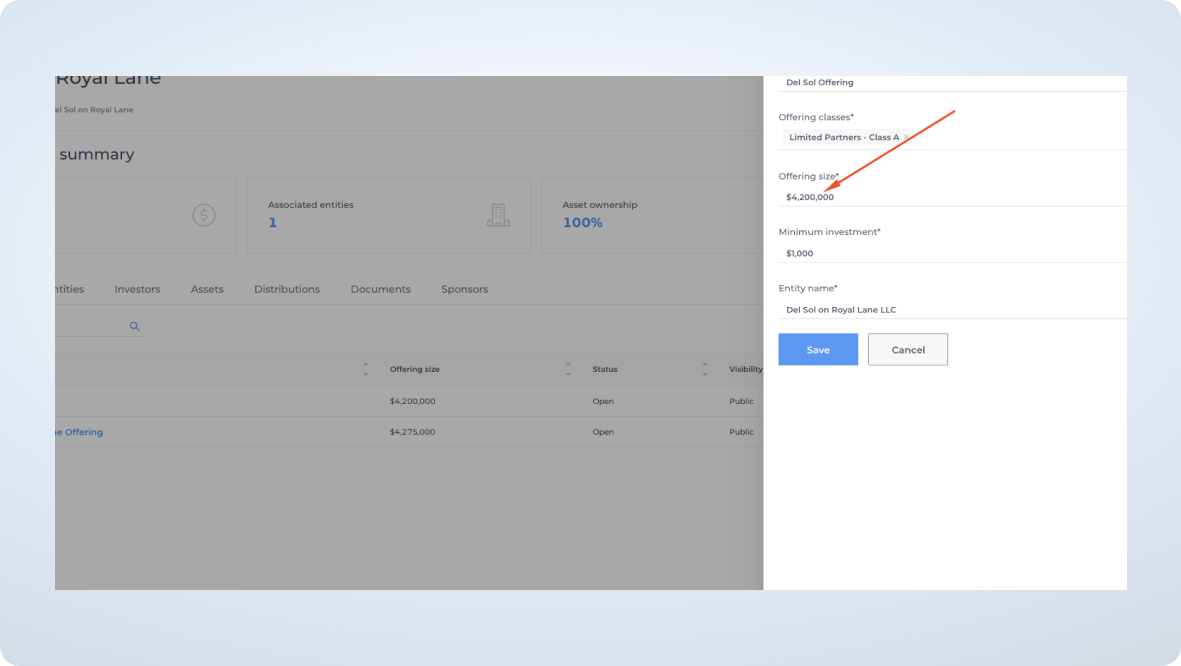
Offering size is the aggregate amount you are seeking to raise.
4. Minimum investment
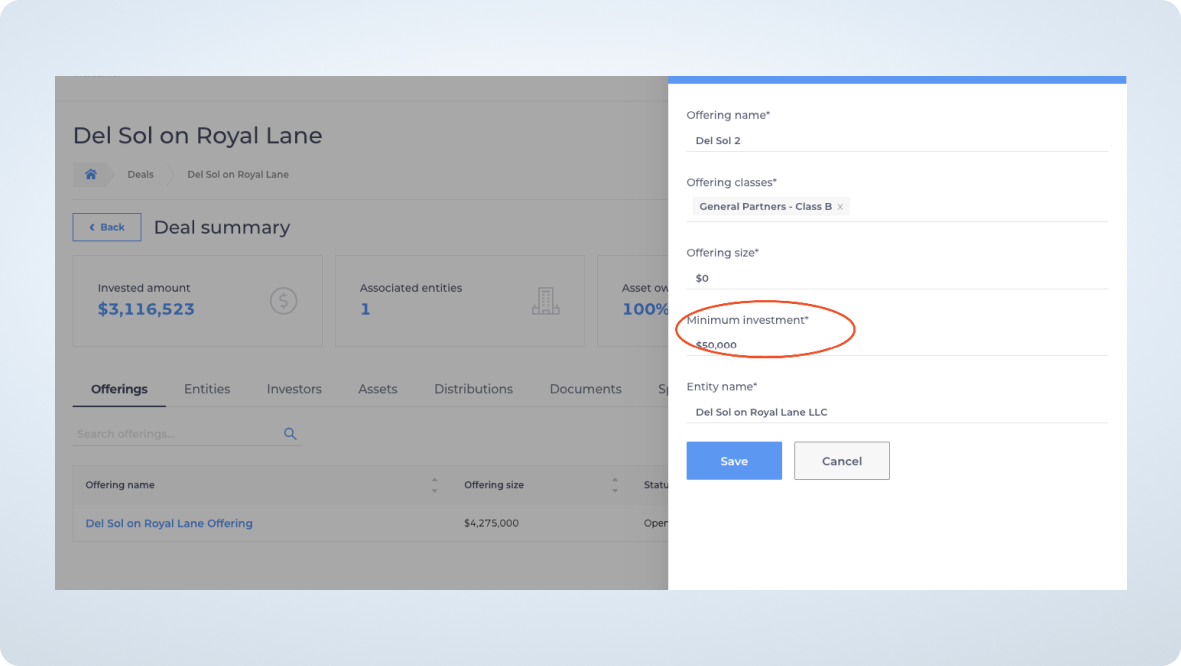
Most syndications require a $50K minimum investment for passive investors. However, you can change this amount depending on your specific situation and the flexibility of your deal. In this type of scenario, you can inform investors individually to contact you so that you can manually adjust it on the portal.
5. Offering Overview
Click on the “Save” button under the Entity name:

Then you will be taken to the Deal summary page. Click on the offering you’ve just created to go to the Offering overview page.

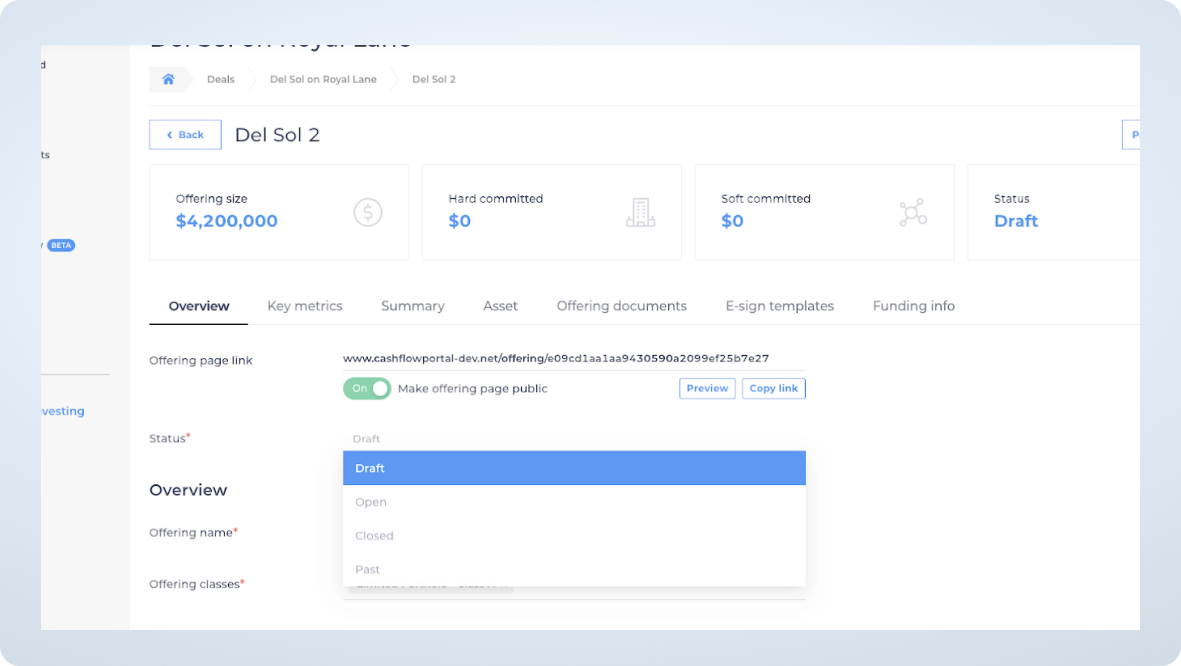
We suggest that you keep your offering page private until you finalize all other details of the offering. If the page is public, anyone with the link can view your offering without being registered on the portal. If you would like to share the link with your co-sponsors or other team members, it would make sense to send them a link to your draft offering page for review before sharing it with your investors. You can do so by clicking on “Copy link.”
Below you can also change the status of your offering by selecting between four statuses:
- Draft
- Open (open for subscriptions and investments)
- Closed (closed for investments)
- Past (For example, for a deal that has been sold after the hold period)
Next, you will be able to review and edit the information you’ve entered in the offering and add a YouTube or Vimeo link for your investors to view.

In the passive investor view, it will show up as an embedded video:

6. Key metrics

Now, let’s review key metrics and clarify what each term means:
- Est. CoC return or Cash on Cash return serves as a measurement of return on investment. You can calculate it annually by dividing the cash flow you receive by your initial investment. CoC return depends on many factors, including the number of repairs, equity split, loan rate, etc.
- IRR on 5-year hold. IRR is the internal rate of return, a calculation of the annual rate of growth that your investment is forecasted to generate. In simple terms, IRR is what is earned on each dollar invested for each period the dollar is invested.
- Equity multiple is the amount that an investor’s equity will be multiplied throughout the projected hold period.
- Annualized return is calculated by taking the annual CoC returns for each hold year and averaging them.
- Refinancing after 2 years allows for repayment of the original loan and returns a portion of the capital to the investors. Each case is unique and if refinancing is not the right strategy for you, avoid this option
- Conservative underwriting. If you keep this option “on,” it means that you, as a syndicator, mitigate the risk of losing money by underwriting using very conservative numbers, taking into account the cyclical nature of the market and other operational risks.
7. Offering summary

Offering summary is basic information that usually contains the following:
- Property price
- Units
- Price per unit
- Down payment
- Loan amount
- Loan type proposed
- Interest rate
- Amortization
- Rentable SF/ price per rentable square feet
- Year built/ renovated
- Lot size
8. Asset
On the Asset tab, you will need to add the property’s photos, address, property type, number of units, year built; year renovated, acquisition price, acquisition date, net asset value, and property class.
While most of these terms are self-explanatory, let’s have a closer look at the property class and net asset value.

Multifamily property classes:
- Class A apartments are new and luxurious apartment complexes less than ten years old and located in desirable areas. They have the highest price per unit.
- Class B apartments are 15-20 years old, well-maintained, and have a cap rate between Class A and Class C.
- Class C apartments are over 30 years old and usually incur below-market rents. They require a higher CAPEX budget due to their outdated interiors and exteriors. However, Class C apartments typically provide the best cash flow.
- Class D are properties that are over 40 years old and are generally considered run-down properties.
Net asset value is the total value of the property, minus the cost of CAPEX and any outstanding debt.
9. Offering documents

Three primary documents that constitute the offering package for a multifamily syndication are:
- Private Placement Memorandum or PPM also called an Offering Memorandum. This document contains every investment detail and offers investors a complete understanding of the securities being offered and the company’s objectives. A PPM is legally required by the SEC and is mandatory for a private placement offering.
The “Important Notices” section of a PPM describes which exemption is used (506(b) or 506(c)). Exemption 506(b) allows you to raise equity from unlimited accredited investors and only 35 sophisticated investors. It prohibits open solicitation or advertising. Exemption 506(c) allows for solicitation and advertising, however, permits equity raising only from accredited investors.
- The operating agreement defines and governs the roles and responsibilities of the LLC’s managers and members.
- A subscription agreement is a form that investors complete, sign and submit to the sponsor to invest in the deal. It contains an investor questionnaire that requires them to prove their suitability to invest in the deal and the amount of equity they are willing to invest.
10. E-sign templates and investor types
Once you are in the E-sign templates tab, you can create templates that your investors will e-sign once your offering is ready for subscriptions.

When you click on “Create a template,” you will see the following page:
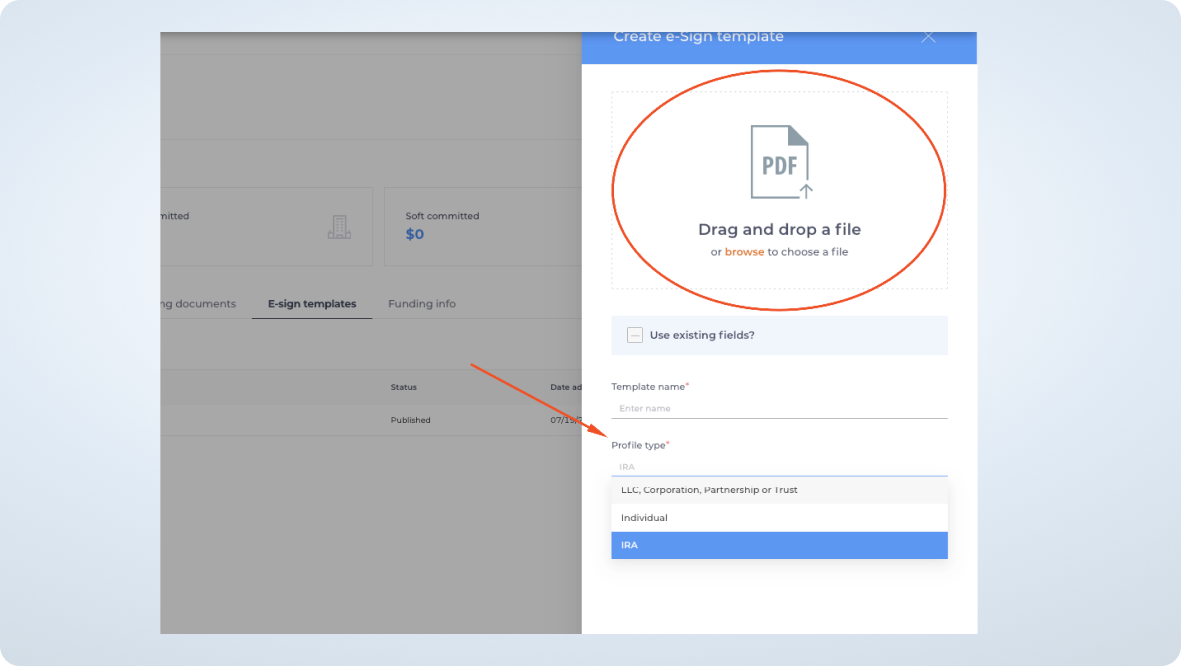
You can give your template a name (PPM, operating agreement, subscription agreement), upload your documents, and choose the investor profile type. If you already have an existing template that you uploaded previously to this offering, you can reuse the fields from that template. These fields are what investors need to complete, including their signature, name, address, etc.

Investor types
Now, let’s take a look at the investor types.
- IRA. Real estate syndications are very attractive for investors with self-directed IRA plans. However, to execute such an investment, an investor needs to work with a custodian and have them review and sign offering documents. IRA investors also need to ensure that they follow IRS rules regarding disqualified persons and prohibited transactions.
As a deal sponsor, you should have clear language related to specific considerations for IRA in your PPM, as well as disclosures on the possibility for your deal to create unrelated debt-financed income or unrelated business taxable income. You should also know that bonus depreciation resulting from your cost segregation study does not apply to an IRA. You must add an IRA Custodian address, Tax ID, and distribution method to the documents that the investor will print and send to the custodian for processing.
- An individual fully manages his/her money to achieve financial goals and is responsible for understanding the market and associated risks. Individual investors can be accredited or sophisticated.
- LLC, Corporation, Partnership, or Trust invest as legal entities and utilize entity’s capital for investments.
11. Funding info
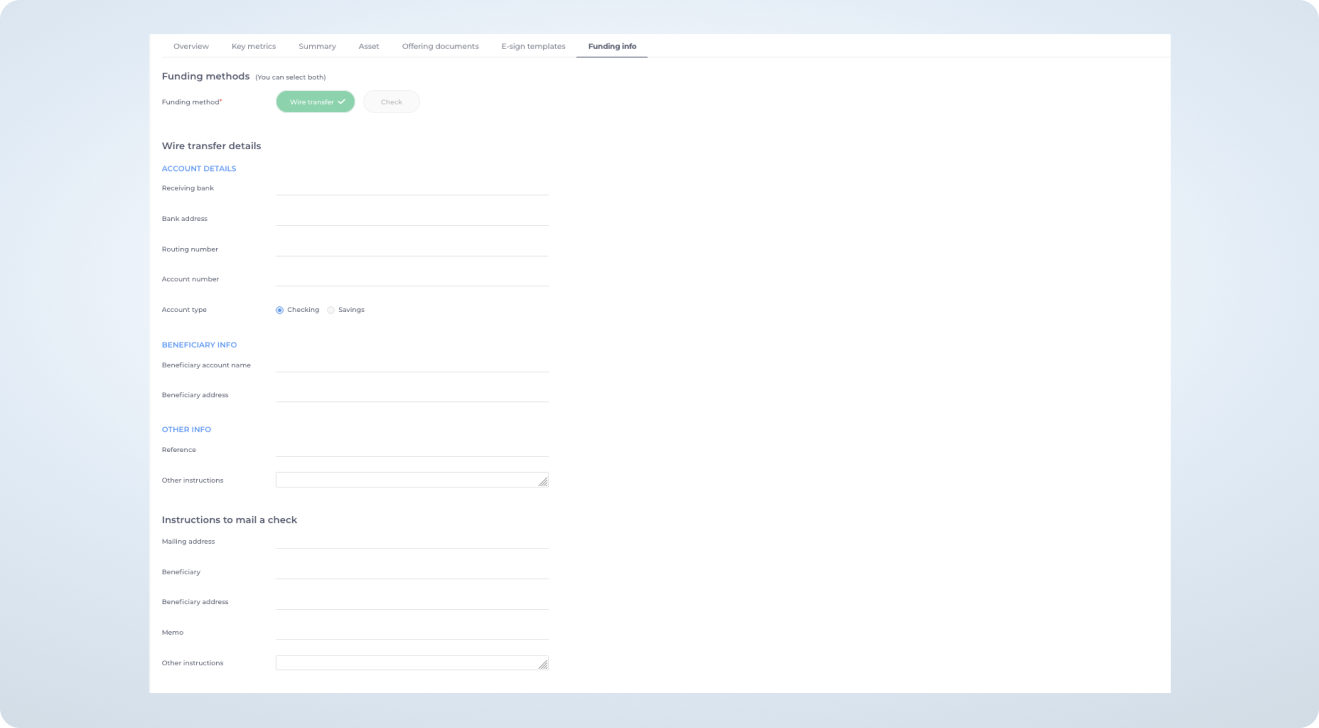
Once ready, go to the Funding info tab and fill out the fields. You can select one or two funding methods, add your account details, and/or instructions to mail a check. Your investors will see this information once they e-sign the offering documents.
12. Email the link to your investors
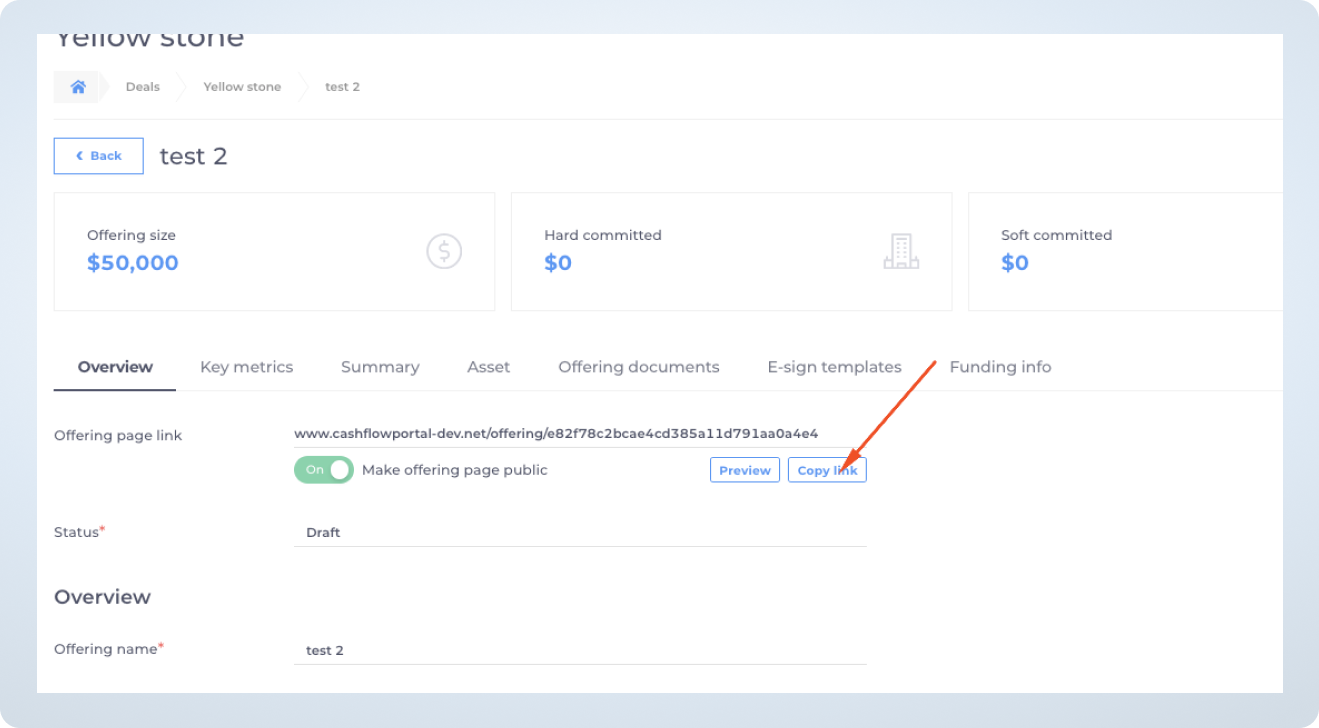
- Go back to your offering overview page and click on “Copy link”
- Use your client’s email or your favorite email marketing tool to send the link to your investors.
About the author

Kristina Xie
Kristina Xie is a real estate syndication enthusiast. She invests in properties in NYC, however became interested in large scale multifamily units after attending her first real estate conference in November 2021. When she is not actively interviewing people or writing articles, she enjoys the outdoors and traveling around the world!
Related posts

Demo: Investing in a deal as a joint tenancy using Cash Flow Portal
By Kristina Xie | 12/10/21 | Software demos
When syndicating a deal using Cash Flow Portal, it is common to encounter couples investing as a joint tenancy. In this guide, we will walk you through the process of creating e-sign templates and allowing your LPs to invest as a joint tenancy. #1 Create a deal The first step is to create a deal […]

How to invest in a deal using Cash Flow Portal. Passive investor demo
By Kristina Xie | 10/06/21 | Software demos
Step 1: Follow the link sent by your GP or co-sponsor to view the deal offering: You should have received the link by email from your sponsor. Once you click on it, you will see the deal dashboard, and then you can click the “Invest now” button to begin. Log in or sign up to […]
How to raise equity for a multifamily deal using Cash Flow Portal
By Kristina Xie | 04/09/21 | Software demos
Have you have ever syndicated a deal or passively invested in one? If the answer is yes, then read this post to learn how to raise equity for a multifamily deal using Cash Flow Portal. If the answer is no, you may want to check out our multifamily due diligence checklist before you get started. […]
Most popular posts
 AI for Capital Raisers07/08/26 | Guides for syndicators
 Best CRM for Capital Raisers07/01/26 | Guides for syndicators
 The 10 Hottest Cities to Invest in Real Estate Before 202507/20/22 | Announcements
 Bonus Depreciation for Real Estate Professionals09/09/21 | Passive investor guides
 Free tools to help you develop your real estate syndication blog in 202108/06/21 | Guides for syndicators
Categories


 Seattle, WA







Products
Capital raising
Why Cash Flow PortalEquity raising simplifiedFunds on Cash Flow PortalCo-sponsorsCustom brandingInvestor portal
Investor managementGP / Co-GP dualityDistributionsLP experienceK1s / documentsReporting and updatesAccreditation / KYC / AMLReal estateBanking
Integrated bankingLeads
New leads©2026 All rights reserved. Cash Flow Portal Inc.